
Download Halloweenie – Free Halloween Avatar Generator for Windows, macOS, Android & iOS
Overview
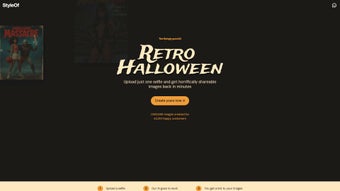
Halloweenie by StyleOf is a playful, web‑based application that lets anyone turn ordinary photos into uniquely spooky avatars perfect for the Halloween season. Powered by a custom AI model from Fal.ai, the tool analyses the uploaded image, interprets facial features, and blends them with Halloween‑themed elements such as pumpkins, cobwebs, eerie lighting, and creature transformations. Users can choose a gender‑specific styling option, ensuring the final output respects the original portrait while adding a haunting twist.
The platform emphasizes privacy: images are processed locally in the browser, no personal data is stored on servers, and creators retain full ownership of their generated avatars. Once satisfied, users can instantly download the high‑resolution result and share it on social media with the #Halloweenie hashtag, joining a vibrant community of horror‑enthusiasts. Whether you’re preparing a costume, updating a profile picture, or just looking for a fun way to celebrate the spookiest night of the year, Halloweenie offers a free, secure, and instantly rewarding experience.
The service also includes an optional seasonal premium filter pack that adds extra animations and custom backgrounds for those who want to take their spooky art a step further, but the core functionality remains completely free.
Key Features
- AI‑driven image transformation with custom Halloween motifs that adapt to facial geometry.
- Gender‑based styling for more accurate facial adaptation and natural‑looking accessories.
- One‑click download of high‑quality PNG files with transparent backgrounds.
- Privacy‑first processing – all calculations happen locally, no server‑side storage.
- Social‑share ready with auto‑generated hashtags and pre‑written captions.
- Responsive web design – works on desktop, tablet, and mobile browsers without additional software.
- Free core tool with optional premium seasonal filters released each year.
- Accessibility mode with alt‑text descriptions for visually impaired users.
Installation & Usage Instructions
Because Halloweenie is a web application, there is no traditional “installation” process. Users simply need a modern browser (Chrome, Edge, Firefox, Safari, or Opera) and an internet connection for the initial page load. Follow these detailed steps to start creating your spooky avatar:
- Visit the official site. Navigate to halloweenie.styleof.com. The landing page loads instantly thanks to lightweight JavaScript and CDN‑hosted assets, and a short privacy notice explains the client‑side processing model.
- Upload your photo. Click the “Upload Image” button, select a portrait from your device, and wait a few seconds while the AI analyses the picture. The tool accepts JPEG, PNG, and WebP formats up to 10 MB. If your image exceeds the limit, the site offers an on‑page resizer to reduce file size without quality loss.
- Select a gender style. Choose “Male,” “Female,” or “Neutral.” This choice guides the AI’s facial mapping, ensuring that spooky accessories such as fangs, witches’ hats, or skeletal overlays align perfectly with facial landmarks.
- Customize the theme. A set of toggle switches lets you add extra effects: glowing eyes, foggy backgrounds, animated bats, or a pulsating moon. Each toggle updates the preview in real time, allowing you to experiment before committing.
- Generate the avatar. Press the “Create My Halloween Avatar” button. Within 5‑10 seconds, the AI returns a fully rendered image. A progress bar shows the processing stage, and a small tooltip explains each AI step for transparency.
- Download & share. Click “Download” to save the PNG to your device. Use the pre‑filled caption and #Halloweenie hashtag to post on Instagram, TikTok, Facebook, or Discord, instantly joining the community. The site also provides a QR code for quick mobile sharing.
- Save your project. If you create an account (optional), you can store up to ten past avatars in a personal gallery, making it easy to retrieve and reuse your favorite designs for future events.
Because all processing happens client‑side, the tool can continue to operate offline after the initial page load. This makes Halloweenie exceptionally fast and secure – your photo never leaves your computer, and no tracking cookies are set.
Compatibility & System Requirements
Halloweenie is built with responsive web technologies, meaning it runs on any operating system that supports a modern browser. The official supported platforms include:
- Windows 10/11 – Chrome, Edge, Firefox, or Safari (via Windows Subsystem for Linux).
- macOS Monterey or later – Safari, Chrome, or Firefox.
- Linux distributions – Any recent distro with Chromium‑based browsers such as Chrome or Vivaldi.
- iOS 14+ – Safari or Chrome app on iPhone and iPad.
- Android 9+ – Chrome, Firefox, or Edge.
Because the application runs entirely in the browser, there is no need for additional downloads, admin rights, or device‑level installations. Minimum hardware requirements are modest: a processor capable of running JavaScript (virtually any device made after 2015) and at least 2 GB of RAM. For the best experience, especially when working with high‑resolution photos, a stable broadband connection (minimum 5 Mbps) is recommended. Users on slower connections can enable a “low‑resolution mode” that reduces the AI’s processing load while still delivering recognizable spooky effects.
The site also includes an accessibility mode that adds alt‑text descriptions for visually impaired users, complying with WCAG 2.1 AA standards. Keyboard navigation is fully supported, and a high‑contrast theme is available for users with vision challenges. These inclusivity features ensure Halloweenie is usable by a broad audience, from casual social‑media fans to professional designers who need quick seasonal assets.
Pros, Cons, and Frequently Asked Questions
Pros
- Free core functionality with no hidden subscription fees.
- AI model produces truly unique Halloween‑themed avatars that stand out on social platforms.
- Privacy‑first design – images never leave the user’s device or get stored on external servers.
- Works on all major operating systems and browsers thanks to a pure web implementation.
- Quick generation time (under 10 seconds for most images) even on average hardware.
- Community integration with auto‑generated hashtags and a built‑in gallery for easy sharing.
- Accessibility features and responsive design make it inclusive for all users.
- Optional seasonal premium filters allow advanced customization without compromising the free core.
Cons
- Requires an internet connection for the initial page load, though offline mode works afterward.
- Limited to Halloween‑related themes; the tool does not support other holiday or generic filters.
- Advanced customization options, such as custom backgrounds and animated overlays, are locked behind a seasonal premium.
- Large image files (>10 MB) must be resized before upload, which adds an extra step for high‑resolution photographers.
- Performance may degrade on very old browsers that lack modern JavaScript support.
FAQ
Is Halloweenie really free?
Yes, the core avatar generator is completely free. Premium seasonal filters may be offered for a small fee, but the basic spooky transformation has no cost.
Do I need to create an account?
No account is required. The tool works anonymously, and no personal data is stored on the server. An optional account can be created to save avatars in a personal gallery.
Can I use the generated avatar for commercial purposes?
Yes. All images are owned by the user who creates them, and you are free to use them for personal or commercial projects, provided you comply with the platform’s terms of service.
What browsers are supported?
The latest versions of Chrome, Edge, Firefox, and Safari are fully supported. Older browsers may experience reduced performance or lack certain visual effects.
How does Halloweenie protect my privacy?
All image processing occurs locally in the browser using WebAssembly. No image data is uploaded to external servers, and the site does not set tracking cookies. The privacy policy is displayed on the landing page for full transparency.
Can I edit the avatar after it’s generated?
Yes. After generation, you can reopen the avatar in the editor, adjust toggles, change the gender style, or apply premium filters if you have purchased them.
Conclusion & Call to Action
Halloweenie by StyleOf delivers a delightful blend of AI creativity and seasonal fun, making it the go‑to tool for anyone who wants a quick, free, and secure way to generate spooky avatars for Halloween. Its browser‑based architecture ensures that users of Windows, macOS, Linux, iOS, or Android can access the service without any hassle, while the privacy‑first approach respects user data. The intuitive UI, extensive feature list, and instant download capability provide a seamless experience for casual social‑media users, content creators, and event planners alike. Even though the tool is limited to Halloween motifs, the quality of the AI‑generated artwork rivals many paid desktop alternatives, and the optional premium filters give power users room to expand their creativity each year.
Ready to join the Halloweenie community? Visit the site now, upload your favorite portrait, and share your eerie masterpiece with #Halloweenie. Bookmark the page for next year’s updates – new themes and premium filters are released annually, keeping the experience fresh and spooky.
Overall rating: 4.6/5 – a fun, fast, and privacy‑centric tool that brings the Halloween spirit to your digital life.



.png)



